For alterations & tailoring shops
DoneDocket is the counter system for alterations businesses — job dockets in seconds, receipts a tailor can work from, the week's workload in dollars, and customers texted the moment their job is ready. Built by an alterations shop owner, for alterations shop owners.
22,400+ real orders and counting · every screen below is the real product
The counter
Tap the garment, tap the alteration — it's priced from your own price list automatically. Add the measurement note, take the money, print.
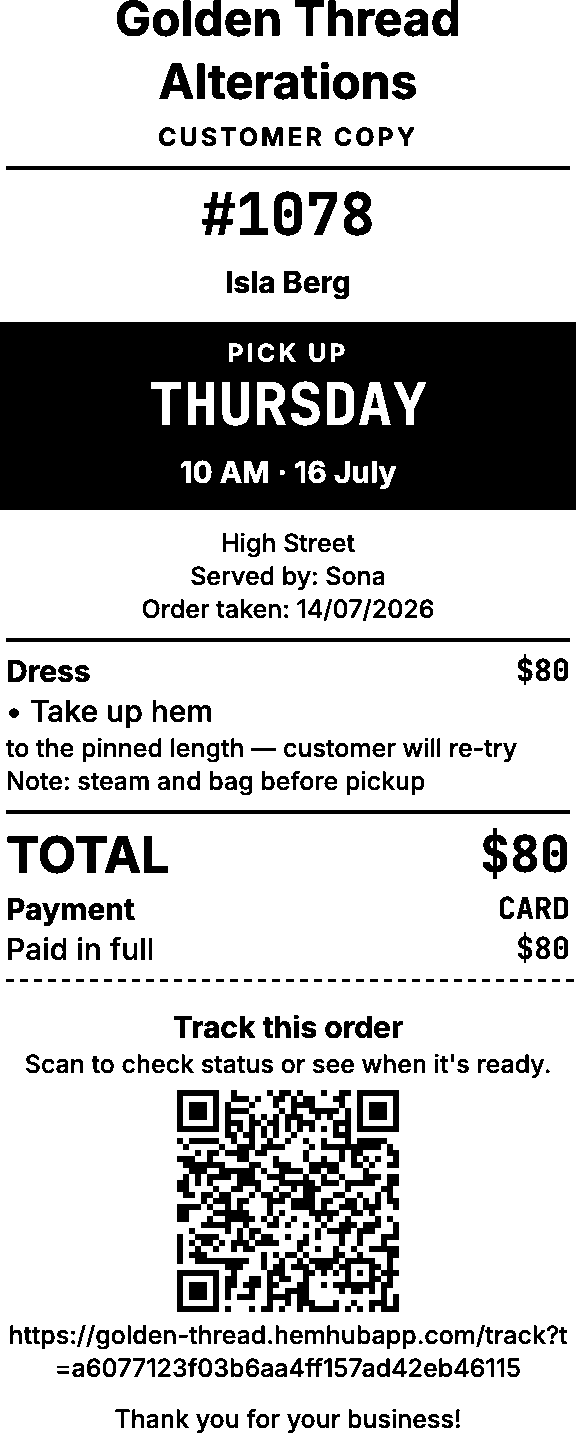
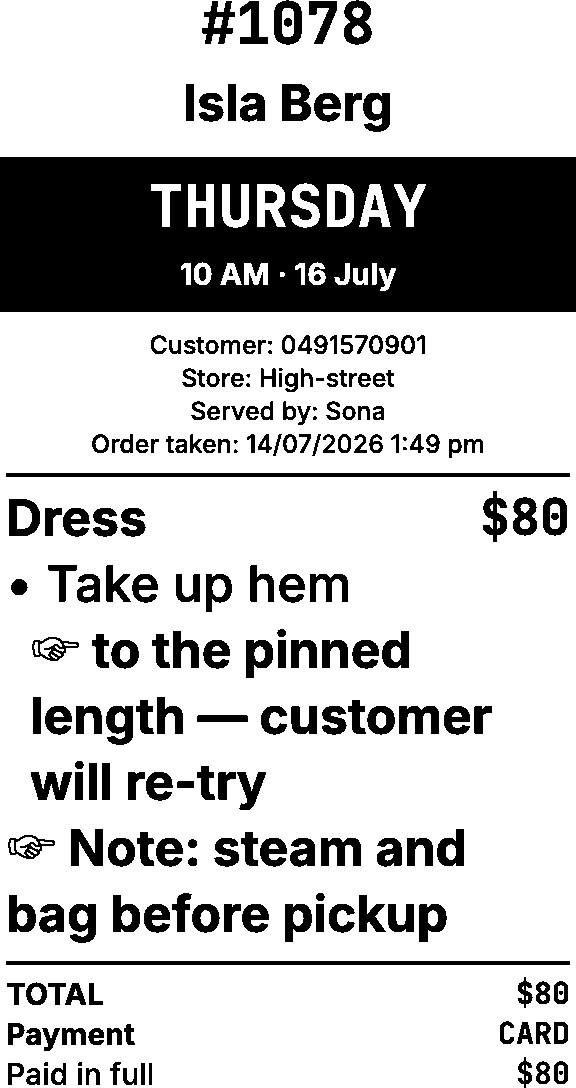
Two copies come off the receipt printer you already own. The customer's copy shows what's owing, plus a QR code they can scan to check on their order. The store copy is the work docket — the pickup day in a bold black band, the customer's name big enough to spot on the rack, the measurement note in heavy type.
Shown exactly as they print.
The board
Jobs land on the day they're due, each one a docket card with its garments, notes and what's owing. The headline reads the day for you: how many jobs, what they're worth, what's still to do. Tomorrow's total is one glance away, the calendar shows which days are already heavy, and the order form warns you before you promise another coat on an overloaded Thursday.
Customers
Mark a job ready and the customer gets a text — their name, their order, automatically, every time. The receipt's QR code opens a live order page, so “is it ready yet?” answers itself; when they're on the way, one tap tells your counter they're coming to collect. And if they text back, the reply shows up right on their order — answer it in a tap.
Finished a job at 9 pm? The text waits until you're open.
Deposits & balances
Half up front is how alterations actually works, so DoneDocket treats it properly: take a deposit at the counter, or send the job out unpaid, and what's owing stays on the job — on the docket, the board and the pickup screen — until it's collected. No notebook of who-still-owes-what: the collect button already knows the number.
Card payments work with the EFTPOS terminal you already have — and a direct connection through Linkly (certified by ANZ, CBA, NAB, Westpac and 11 more banks) is rolling out, so the total lands on the terminal without retyping.
Your team
Everyone works under their own four-digit PIN, so every order, payment and change carries a name — no shared logins, no guessing, and the full history is always there. Shifts and breaks clock in on the same screen, and payroll comes out the other end with your overtime rules already applied, ready for your bookkeeper.
Reviews
After pickup, customers get a one-minute survey by text — your questions, your wording. Scores and comments come straight back to you, and posting a Google review is one tap from the thank-you screen. Your rating grows while you sew.
Also in the box
New customers sign themselves up on a counter iPad — and appear on your board instantly.
Takings by day, who did how much, and your busiest days at a glance.
Every order keeps its own timeline; every job ever, one searchable table.
Give credit, spend it at pickup — refunds come back as credit automatically.
Per-store hours, pricing, receipts and review links — same board, same system.
Receipts print instantly on the printer you already own — nothing to maintain.
iPads at the counter, the owner's phone at home — any browser, nothing to install.
Your shop runs at its own private address — yourshop.donedocket.com — and your data stays yours.
DoneDocket is the system behind Alter Ego — one of Melbourne's highest-volume alterations shops. Running on it, Alter Ego grew from one store to two in under six months, and its counters have earned over 400 five-star Google reviews in two years. When DoneDocket opened up to other shops, it carried Alter Ego's 22,000 orders and 12,000 customers across without losing a single one. Every feature on this page exists because a tailor needed it on a Tuesday.
1 → 2 stores in <6 months · 22,400+ orders · ★★★★★ 400+ Google reviews
Questions
No. DoneDocket prints to the standard receipt printers most alterations shops already own — one small install on the counter computer, and it looks after itself from then on.
Yes — migration is part of onboarding. Orders, customers, balances, the lot.
A four-digit PIN. The board is a diary; the order form is tap-tap-done. Shops have switched over in a morning.
Your shop gets its own text number with a monthly bundle of texts included. Customers can reply — replies land on your board.
Three plans, month to month: Solo $49, Shopfront $99, Multi-store $199 — founding rates while the beta runs, no lock-in contracts. See pricing.
A 20-minute walkthrough with the people who built it — bring your trickiest job and we'll run it through.
Book a walkthrough